Ask Your Favorite AI
Copy this article in AI-ready Markdown for ChatGPT, Claude, Gemini, and more.
To run a WooCommerce store successfully, it is important to help customers find the products quickly and easily. As your product catalog grows, browsing can become overwhelming without the right tools in place. That’s where the advanced SearchFilterSort plugin makes all the difference. By optimizing your WooCommerce store with powerful search, filtering, and sorting options, you can:
- Improve navigation
- Enhance user experience
- Increase conversions
In this guide, we’ll show you how advanced search and filters can transform your WooCommerce store and how to implement them effectively.
Why Advanced Search and Filters Matter in WooCommerce?
Online shoppers expect speed and control. And, if they can not find what they’re looking for within a few clicks, they’re likely to leave. Advanced search and filtering help by:
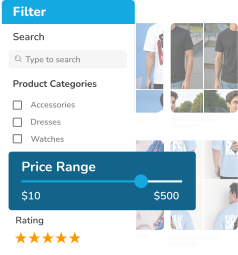
- Allowing shoppers to narrow down products by price, category, rating, or attributes.
- Making large product catalogs easier to browse.
- Reducing friction in the buying journey.
- Increasing engagement and time spent on your store.
- Helping customers make confident purchasing decisions.
The easier it is to find the right product, the more likely customers are to convert.
Common Problems with Default WooCommerce Search
While WooCommerce includes basic search and sorting options, they often fall short for growing stores. Default WooCommerce search:
- Lacks advanced filtering options.
- Offers limited customization without code.
- Can feel slow or outdated for modern shoppers.
- Doesn’t always work well with custom product data.
To truly optimize your store, you need a more flexible and powerful solution.
How Advanced Search and Filters Improve the Shopping Experience?
With advanced search and filtering, customers can:
- Instantly refine results using multiple criteria.
- Sort products by price, rating, popularity, or date.
- Quickly compare similar products.
- Find exactly what they want without endless scrolling.
This creates a smoother, more intuitive shopping experience that keeps visitors engaged and moving toward checkout.
Optimizing WooCommerce with SearchFilterSort
SearchFilterSort for WordPress and WooCommerce is designed to give store owners full control over how products are searched, filtered, and sorted—without coding.
Key Benefits of Using SearchFilterSort
- Filter by any product data: Categories, tags, attributes, price, ratings, and custom fields.
- Advanced product sorting: Sort by price, popularity, newest products, ratings, or custom meta fields.
- AJAX-powered experience: Results update instantly without page reloads.
- Theme compatibility: Works seamlessly with any WooCommerce theme.
- Easy setup with native WordPress UI: No technical knowledge required.
How to Set Up Advanced Search and Filters in WooCommerce?
Step 1: Install the Plugin
- Go to your WordPress dashboard.
- Navigate to Plugins > Add New.
- Search for SearchFilterSort.
- Install and activate the plugin.
Step 2: Create a Product Filter
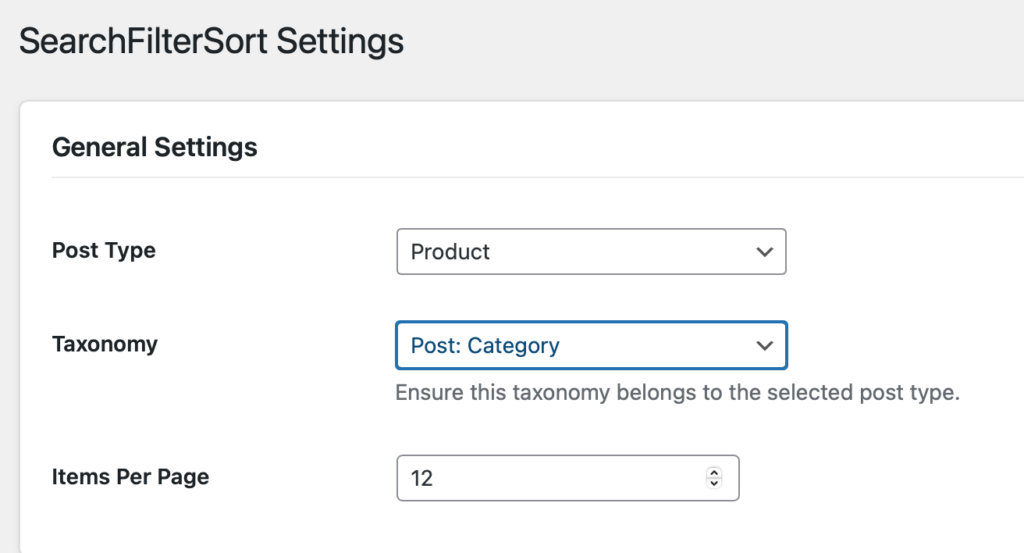
- Go to SearchFilterSort > Settings.
- Select Products as the post type.
- Choose taxonomies such as product categories, tags, or attributes.
- Set the number of products per page.
Step 3: Add Filters and Sorting Options
You can add:
- Category and attribute filters
- Price range filters
- Keyword search
- Sorting options (price, rating, popularity, date)
These controls allow shoppers to customize how products are displayed.
Step 4: Display Filters on Your Store
Use the generated shortcode to display filters:
- Above the product grid
- In a sidebar
- In a horizontal filter bar
SearchFilterSort adapts automatically to your layout and works on all devices.
Best Practices for Using Advanced Search and Filters
- Keep filters relevant: Focus on the options customers actually use.
- Avoid clutter: Too many filters can confuse shoppers.
- Place filters strategically: Make them easy to spot and use.
- Combine filters with sorting: Give customers full control over browsing.
- Test and refine regularly: Adjust filters as your product catalog grows.
The Impact on Conversions and Sales
Stores with advanced search and filtering often see:
- Lower bounce rates
- Higher engagement
- Faster product discovery
- Increased conversions
When shoppers find what they want faster, they’re more likely to buy—and come back again.
Conclusion
Optimizing your WooCommerce store with advanced search and filters isn’t just a nice-to-have, it’s essential for growth. With SearchFilterSort for WordPress and WooCommerce, you can create a fast, flexible, and user-friendly shopping experience that helps customers find the right products in seconds.
If you want to improve navigation, boost conversions, and make your store easier to browse, advanced search and filtering are the way forward.
FAQs
Do advanced search and filters slow down WooCommerce?
No. SearchFilterSort uses optimized queries and AJAX to keep your store fast and responsive.
Can I filter products by custom fields?
Do I need coding skills to set this up?
Can I use advanced filters on mobile devices?
Powered by WPFAQBlock.com
Last updated on July 8th, 2026