Ask Your Favorite AI
Copy this article in AI-ready Markdown for ChatGPT, Claude, Gemini, and more.
Running a WooCommerce store with hundreds or even thousands of products is great for your business. But there is one problem that often comes with a growing catalog: customers can struggle to find what they are looking for. The faster customers can narrow down their choices, the easier it is for them to shop. That’s where the SearchFilterSort plugin with WooCommerce product search, filters, and sorting became important.
In this guide, we’ll look at practical ways to help customers find products faster on WooCommerce and create a smoother shopping experience.
Why Product Discovery Matters in WooCommerce?
Imagine a customer lands on your store looking for a laptop.
Your store has 200 laptops across different brands, screen sizes, processors, storage options, and price ranges. Without the right tool, customers may have to:
- Browse multiple pages
- Open several product pages
- Go back and forth between products
- Remember prices and specifications
- Scroll through products that don’t match their requirements
That creates unnecessary friction. A better experience lets the customer quickly say:
Brand → 16GB RAM → 512GB SSD → Under $1,000 → Highest Rated
Now they are looking at a much smaller selection of relevant products. The goal is not simply to display more products. It is to help shoppers reach the right products with less effort.
1. Add a Prominent Product Search
Search is one of the fastest ways for customers to find a specific product. If someone already knows what they want, they shouldn’t have to navigate through your categories to get there. For example, a customer searching for:
- Nike Air Max
- iPhone 15 case
- Wireless keyboard
- Blue denim jacket
- USB-C charger
should be able to type the product or keyword into a search box and quickly see relevant results. Make your search box easy to find, especially on your shop and category pages. A good product search should also account for the way customers actually search. They may use product names, brands, categories, or general keywords rather than the exact product title.
2. Let Customers Filter Products by Category
Categories are one of the simplest ways to organize a large WooCommerce catalog. Instead of showing every product at once, let customers narrow the catalog to a specific category. For example, an electronics retailer may group its products into:
- Smartphones
- Laptops
- Tablets
- Headphones
- Smartwatches
- Accessories
Once customers choose a category, they can narrow their options and focus on products that match their needs. For larger stores, category filtering becomes even more useful when combined with other filters. For example: Laptops → Gaming → ASUS → 16GB RAM → Under $1,500
This creates a much more focused shopping experience.
3. Add Filters Based on Product Attributes
Category alone usually isn’t enough. Customers often make purchasing decisions based on specific product characteristics. Depending on what you sell, useful WooCommerce filters could include:
- Brand
- Color
- Size
- Material
- Storage
- RAM
- Screen size
- Compatibility
- Style
- Weight
- Product type
For example, a clothing store could let customers filter products by:
Category: Jackets
Size: Large
Color: Black
Material: Leather
A smartphone store might use:
Brand: Samsung
Storage: 256GB
Color: Black
Price: Under $800
The key is to choose filters that align with how your customers typically shop. There’s no need to include every possible filter, as too many unnecessary options can make the shopping experience feel cluttered and confusing.
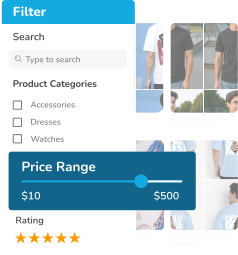
4. Give Shoppers a Price Filter
Price is one of the most common factors customers consider before buying. A shopper may already have a budget in mind, such as:
- Under $50
- $50–$100
- $100–$250
- $250–$500
- $500+
Giving customers an easy way to filter by price immediately removes products outside their budget. This is particularly useful for stores with a wide range of products. Instead of asking customers to manually check prices on every product, let them define their preferred price range and show only the matching products.
5. Let Customers Filter by Ratings
When customers have several similar products to choose from, ratings can help them narrow down their options. For example, a shopper might want to see only products rated four stars or higher. This can be particularly useful for:
- Electronics
- Home appliances
- Beauty products
- Clothing
- Tools
- Accessories
A rating filter gives customers another way to refine their choices without opening every product page. However, do not make ratings the only way customers can evaluate products. Product descriptions, specifications, images, pricing, and reviews all play a role in the buying decision.
6. Use AJAX Filtering to Reduce Waiting
With traditional filtering, the entire page may need to reload whenever a customer changes a filter, which can disrupt the shopping experience. With SearchFilterSort’s AJAX-powered filtering, product results update dynamically without requiring a full page reload, making it faster and more seamless for customers to refine their search.
For example:
- The customer selects “Black.”
- The product list updates.
- They select “Large.”
- The results update again.
- They select “Under $100.”
- The product list becomes even more focused.
The customer can continue refining their search without repeatedly waiting for the entire page to refresh. For stores with large product catalogs, this can make filtering feel much faster and more interactive.
7. Add Sorting Alongside Filtering
- Filtering answers: “Which products should I see?”
- Sorting answers: “How should those products be displayed?”
These two features work particularly well together. After filtering products, customers may want to sort them by:
- Price: Low to High
- Price: High to Low
- Newest
- Rating
- Popularity
- Relevance
- Date
For example, someone shopping on a budget could filter products under $100 and then sort them from lowest to highest price. Another customer might filter by a specific category and sort the results by rating. Giving shoppers both controls lets them decide how they want to explore the results.
8. Make Filters Easy to Use on Mobile
A large portion of online shopping happens on mobile devices, so your product discovery experience needs to work well on smaller screens. A SearchFilterSort sidebar that works beautifully on desktop can become difficult to use on mobile if it takes up most of the screen. Consider using:
- A dedicated filter button
- Collapsible filter sections
- Clear labels
- Touch-friendly controls
- Easy-to-remove active filters
- A visible way to close the filter panel
The goal is simple: customers should be able to filter products without fighting the interface. A good mobile filter experience should feel like a natural part of shopping rather than an extra step.
9. Show Active Filters Clearly
Customers should always know which filters they have applied. For example:
Filters:
Men × | Black × | Size L × | $50–$100 ×
This makes it easy to understand why certain products are appearing. It also gives shoppers a quick way to remove one condition without resetting everything. For example, if there are no products matching: Black + Large + Under $50, the customer can remove the price filter while keeping the other selections. Clear active-filter indicators make this process much easier.
Final Thoughts
A large WooCommerce catalog can be a major advantage, but only if customers can navigate it easily. When shoppers can’t find what they’re looking for, having more products doesn’t necessarily help. It can actually make the buying process harder.
That is why fast product discovery should be part of your WooCommerce store strategy. Give customers a clear search box. Add relevant filters. Let them combine multiple conditions. Provide useful sorting options. Make everything easy to use on mobile. Most importantly, don’t make customers work harder than necessary to find the right product.
The easier it is to find a product, the easier it is to move closer to a purchase. With the right combination of search, filters, and sorting, you can turn a large WooCommerce catalog into a much more manageable and customer-friendly shopping experience.
FAQs
The SearchFilterSort plugin provides WooCommerce product search, filters, and sorting to help customers find products faster and create a smoother shopping experience.
Powered by WPFAQBlock.com
Last updated on September 22nd, 2026